 Tyo Susilo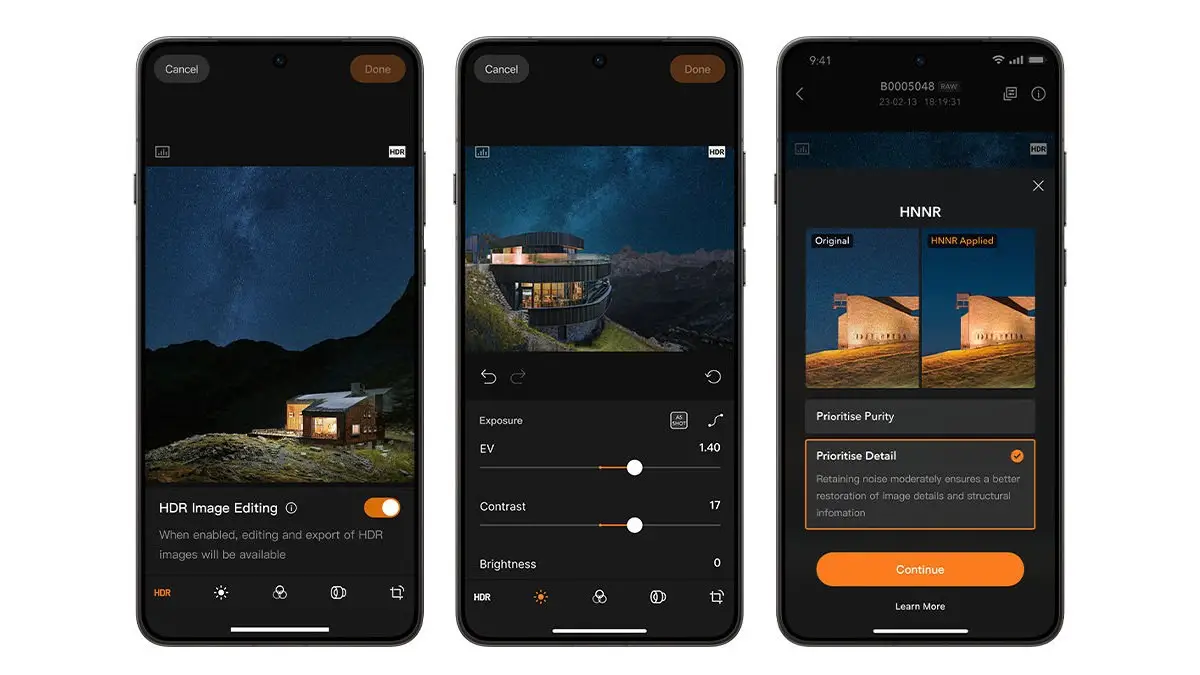
After a prolonged period of exclusivity within the Apple ecosystem, legendary camera manufacturer Hasselblad has officially launched its professional editing application, Phocus Mobile, for Android devices. This significant release marks a pivotal moment for Android users, granting them unprecedented access to Hasselblad’s renowned workflow directly from their smartphones. Previously, Phocus Mobile was solely available on iOS, limiting its reach to iPhone and iPad users. The expansion to Android signifies a strategic move by Hasselblad to democratize its high-end imaging tools and cater to a more diverse global user base of professional photographers and serious enthusiasts.
Unveiling the Phocus Mobile Experience on Android
Phocus Mobile is designed to seamlessly integrate with specific Hasselblad camera models, including the X2D II 100C, X2D 100C, and the 907X & CFV 100C. The application empowers users to import their high-resolution images from these cameras via Wi-Fi or a USB-C cable. Once imported, photographers can meticulously view, manage, edit, and export their RAW files without the necessity of transferring them to a desktop computer. This on-the-go editing capability is a substantial enhancement for mobile workflows, allowing for immediate post-production and sharing of images captured in demanding professional environments.
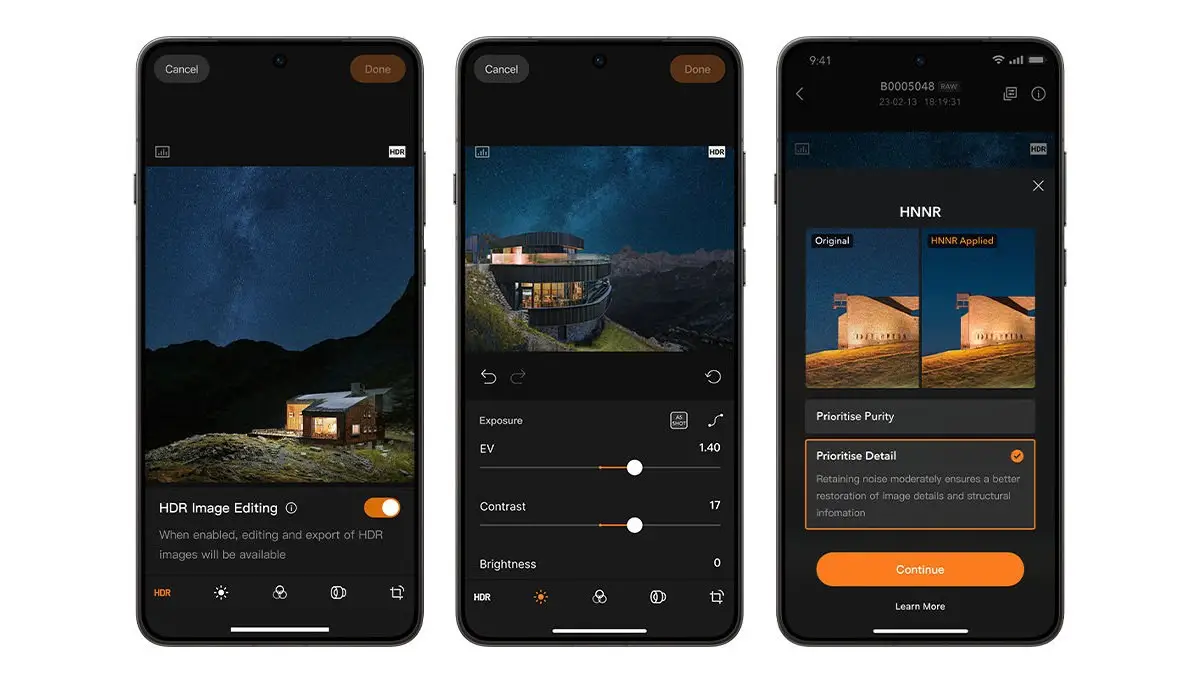
The core of Phocus Mobile’s appeal lies in its integration of Hasselblad Natural Color Solution (HNCS). This proprietary technology is meticulously engineered to ensure that color reproduction, tonal gradations, and highlight details remain remarkably consistent from the initial preview on the device to the final exported image. For Android smartphones equipped with HDR display capabilities, Phocus Mobile promises to render HDR photos with a dynamic range that more closely mirrors the original scene captured by the camera. This fidelity in color and detail is a hallmark of Hasselblad’s commitment to uncompromising image quality, a reputation built over decades of serving the professional photography market.
Advanced Features for Enhanced Image Manipulation
Beyond color accuracy, Hasselblad has integrated an advanced AI RAW Noise Reduction feature within Phocus Mobile. This tool is specifically designed to combat digital noise that can often plague images captured at high ISO settings. The AI-powered process efficiently cleans up noise, preserving image detail and clarity. For a single 100-megapixel RAW file, the noise reduction process typically takes approximately 15 to 20 seconds, a testament to the sophisticated algorithms at play and the processing power of modern smartphones.
Users are presented with two distinct noise reduction modes: Purity Mode, which prioritizes an exceptionally clean image with minimal noise, and Detail Mode, which is engineered to retain fine textures and intricate details within the photograph. This granular control allows photographers to tailor the noise reduction to their specific artistic vision and the characteristics of each individual image.
The editing suite within Phocus Mobile is comprehensive, offering a robust set of tools comparable to professional desktop software. Photographers can precisely adjust exposure, manipulate curves for nuanced tonal control, fine-tune white balance, perform monochrome corrections, apply lens corrections to rectify optical distortions, enhance sharpness, and utilize essential cropping and rotation functions. Additionally, the application includes keystone correction, a valuable tool for architectural and landscape photography to correct converging vertical lines. For efficient workflow management, Phocus Mobile supports batch editing, enabling users to apply selected adjustments to multiple images simultaneously.
Upon completion of the editing process, Phocus Mobile offers extensive export options. Users can choose from a range of common and professional file formats, including JPG, TIFF, HEIF, 3FR (Hasselblad’s native RAW format), and other RAW variations. This flexibility ensures that images can be readily integrated into various post-production pipelines and shared across different platforms and publications.
The Journey to Android: A Strategic Expansion
Hasselblad’s initial foray into mobile editing software began with Phocus Mobile for iOS, launched to complement its high-end digital medium format cameras. The decision to expand to Android, a platform with a significantly larger global market share, represents a calculated effort to broaden its customer base and provide a more inclusive ecosystem for its users. While Apple’s devices have historically been favored by creative professionals for their integrated hardware and software solutions, the burgeoning capabilities of high-end Android smartphones, particularly in processing power and display technology, have made them increasingly viable alternatives for demanding mobile applications.
The development and release of Phocus Mobile for Android likely involved extensive testing and optimization to ensure it could leverage the diverse hardware capabilities of Android devices. This includes adapting to various screen resolutions, processor architectures, and GPU capabilities, all while maintaining the high standards of image processing and color accuracy that Hasselblad is known for. The successful porting of such a sophisticated application suggests a significant investment in research and development by Hasselblad, underscoring their commitment to meeting the evolving needs of digital photographers.
Context and Implications for the Photography Industry
The availability of professional-grade RAW editing software on mobile devices has been a growing trend, but the integration of a tool from a brand like Hasselblad carries particular weight. It signifies a further blurring of the lines between traditional desktop-centric post-production and mobile-based workflows. For professional photographers who frequently travel or work on location, the ability to conduct critical editing and review of their RAW files directly on a smartphone or tablet can significantly streamline their workflow, reduce turnaround times, and enhance their on-site decision-making.
This move could also influence how other camera manufacturers approach their software offerings. The expectation for seamless integration between camera hardware and mobile applications is likely to increase, potentially spurring further innovation in this area. Furthermore, it provides a compelling reason for photographers who might have previously considered Hasselblad cameras but were hesitant due to the lack of robust mobile editing support on their preferred platform, to re-evaluate their options.
The implications for the broader photography market are also noteworthy. As mobile devices become more powerful and sophisticated editing tools become more accessible, the barrier to entry for high-quality digital photography continues to lower. While Phocus Mobile is specifically tied to Hasselblad cameras, its existence on Android highlights the platform’s maturity and its capability to handle demanding creative tasks. This can only benefit the Android ecosystem as a whole, attracting more professional-grade applications and services.
Looking Ahead: The Evolving Mobile Photography Landscape
The introduction of Phocus Mobile on Android is more than just a software update; it is a statement about the future of professional photography. It acknowledges the increasing importance of mobile technology in the creative process and signals Hasselblad’s dedication to supporting its users across multiple platforms. As smartphone hardware continues to advance, we can anticipate further integration of advanced computational photography features and more sophisticated editing capabilities becoming standard.
Hasselblad’s decision to bring Phocus Mobile to Android is a testament to the platform’s growing power and versatility. It empowers a new generation of photographers with access to tools previously reserved for a select few, all while maintaining the exceptional quality that defines the Hasselblad legacy. The question for users of compatible Hasselblad cameras now shifts from "can I edit my RAW files on my phone?" to "how will this change my workflow and creative output?" The answer, it seems, is poised to be a significant improvement in efficiency and creative freedom.