
 Tyo Susilo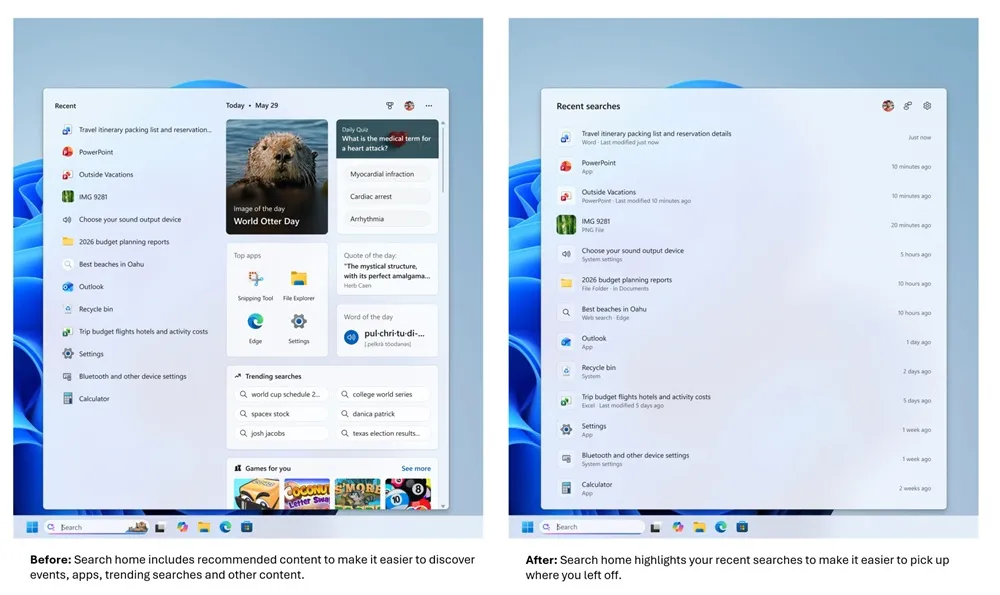
Microsoft is implementing significant changes to the Windows Search Box, a pivotal feature integrated into the taskbar, aiming to provide a more streamlined and user-centric experience. Recent updates, first introduced through Windows Insider builds, reveal a markedly cleaner interface devoid of promotional content. This redesign is complemented by substantial improvements in search accuracy and expanded user control over the search box’s appearance and behavior. The initiative signals Microsoft’s ongoing commitment to refining the core Windows user experience, addressing feedback that previously highlighted the search bar’s clutter and intrusive recommendations.
A Renewed Focus on Simplicity and User Control
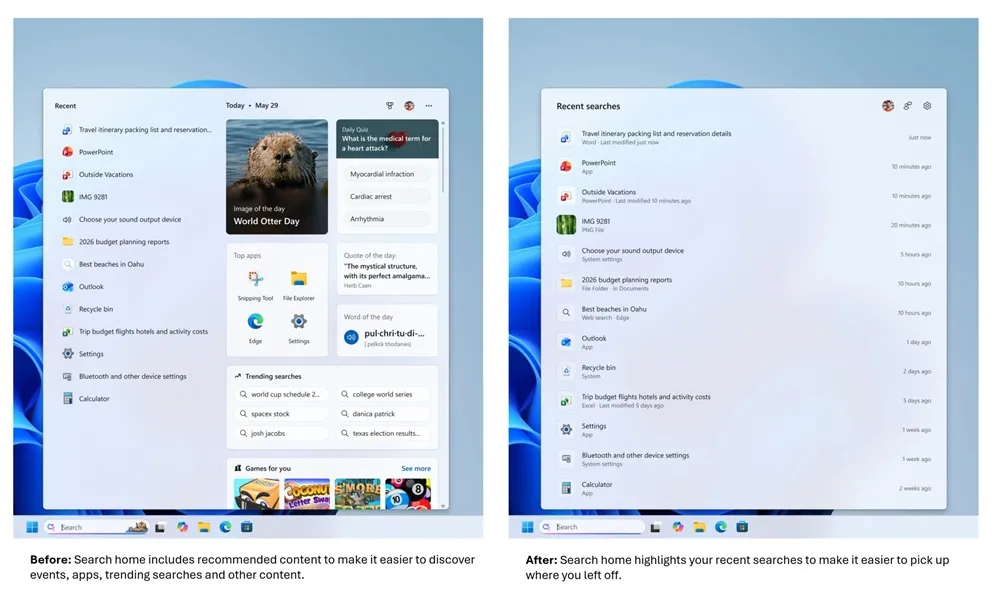
Historically, the Windows Search Box has served as a central hub for users to find applications, files, settings, and access web searches. However, its evolution had led to an increasingly crowded interface. The previous iteration often featured a mix of advertisements, event promotions, app recommendations, and web search suggestions, which, while intended to enhance discoverability, frequently detracted from the core search functionality and created a less intuitive user experience.
The latest iteration, as observed in the Windows Insider Program, dramatically simplifies the main search page. Upon opening the search box, users are now greeted with a clean display of their recent search history. This history is presented with greater detail, including timestamps and clear labels indicating the type of result, such as applications, files, settings, web results, or Microsoft Store items. This shift prioritizes immediate access to past activities and reduces the cognitive load associated with navigating a busy interface.
This move towards a cleaner aesthetic aligns with broader trends in user interface design, emphasizing minimalism and functionality. By removing extraneous promotional content, Microsoft aims to make the search box a more efficient and less distracting tool for everyday use. This is a direct response to user feedback, which has often cited the intrusive nature of pop-up recommendations and advertisements within the search interface as a point of frustration.
Enhanced Search Accuracy and Intelligent Recognition
Beyond the visual overhaul, Microsoft has invested in improving the underlying search algorithms. The new Windows Search Box demonstrates a more sophisticated understanding of user queries, even in the presence of minor errors. The system is now better equipped to handle typographical mistakes, missing or extra characters, and incomplete search terms. For instance, a user typing "utlook" instead of "Outlook" will still be presented with the correct application as a top result. This intelligent recognition capability is crucial for ensuring that users can quickly find what they need without being penalized for minor input inaccuracies.
The accuracy improvements extend to the prioritization of search results. When searching for local applications, files, or settings, Windows will now prioritize these local results over web or Microsoft Store suggestions if the local option is deemed more relevant. This rebalancing of search priorities ensures that the most immediate and likely intended results are presented first, enhancing the efficiency of the search process for common tasks.
Furthermore, the system has been optimized for finding local files, cloud-stored documents, and files from connected services. This comprehensive approach to file indexing and retrieval aims to create a unified search experience across various data locations. Notably, the search functionality has been enhanced to support the discovery of files using queries as short as two characters, a significant improvement for users who may recall only fragments of file names. This capability is particularly beneficial in large file repositories, where precise recall can be challenging.
Expanding User Control and Privacy Considerations
A key aspect of the updated Windows Search Box is the increased control granted to users. Through the Settings menu, specifically under Privacy & Security > Search, users can now explicitly choose whether to display results from the web and the Microsoft Store. This granular control allows users to tailor the search experience to their preferences, opting out of external search results if they primarily use the search box for local system navigation.
This feature underscores Microsoft’s growing emphasis on user privacy and data control. By providing explicit options to disable web and store integrations within the search function, the company acknowledges user concerns about data collection and unwanted external suggestions. This move can be seen as part of a broader strategy to build trust and provide a more transparent computing environment.
The ability to customize the search experience is a significant departure from previous, more rigid implementations. It empowers users to define what "search" means to them within the Windows ecosystem, whether it’s a quick way to launch an application, a tool for finding local documents, or an integrated gateway to the broader internet.
Stability and Performance Enhancements
Microsoft also claims that the Windows Search is now more stable, with a reduced likelihood of crashes or loading failures. These performance enhancements are critical for a feature that is used so frequently. A reliable and responsive search function is fundamental to a smooth user experience, and any instability can lead to significant frustration and reduced productivity. While specific technical details regarding these stability improvements have not been extensively detailed, the focus on reducing errors suggests a commitment to the robustness of this core Windows component.
Context and Background: The Evolution of Windows Search
The journey of the Windows Search Box has been one of continuous evolution, often influenced by user feedback and Microsoft’s strategic shifts. Early versions of Windows Search were primarily focused on indexing and finding local files and applications. As the internet became more integrated into daily computing, search functionalities expanded to include web searches and later, app store integrations.
However, this expansion was not without its challenges. For years, users have debated the balance between discoverability and intrusiveness. The inclusion of "suggested apps" and "news and interests" features, while intended to provide helpful context, often proved to be a source of annoyance for many. The recent overhaul appears to be a direct response to these long-standing criticisms, signaling a return to a more utility-focused approach for the search bar.

The Windows Insider Program plays a crucial role in this iterative development process. By releasing these updates to a select group of users, Microsoft can gather real-world feedback and identify potential issues before a wider rollout. This phased approach allows for a more refined product that is better aligned with user expectations.
Analysis of Implications
The implications of these changes are multifaceted. For users, the primary benefit is a cleaner, more efficient, and personalized search experience. The enhanced accuracy and intelligent query handling mean less time spent troubleshooting or rephrasing searches. The increased control over search results empowers users to curate their computing environment, focusing on the information and tools that are most relevant to them.
From a competitive standpoint, these improvements help Windows maintain its relevance in an increasingly complex digital landscape. As operating systems become more integrated with cloud services and AI-powered features, a robust and intuitive search function is paramount. By simplifying the interface and improving core functionality, Microsoft is reinforcing its position as a provider of user-friendly and powerful operating systems.
However, the success of these changes will ultimately depend on their seamless integration and the continued refinement of the search algorithms. While the initial feedback from Insider builds is reportedly positive, wider adoption will be the true test. The removal of promotional content, while welcomed by many, might also impact Microsoft’s strategies for app promotion and engagement, potentially requiring alternative approaches to highlight new features or services within the Windows ecosystem.
Future Outlook and Rollout
As of the current reporting, these enhancements are still undergoing testing within the Windows Insider Program. Microsoft has not yet provided a definitive timeline for when these updates will be made available to the general public. This phased rollout strategy is typical for major Windows feature updates, allowing for thorough testing and iterative improvements based on feedback from a diverse user base.
The anticipation surrounding these changes is palpable, with many users eager for a more streamlined and effective search experience. The focus on user control and core functionality suggests a renewed commitment from Microsoft to listening to its user base and delivering an operating system that is both powerful and intuitive. As these updates progress through their development cycle, the tech community will be watching closely to see how these significant revisions shape the everyday interaction with Windows.
The path forward for Windows Search appears to be one of intelligent simplification and user empowerment. By stripping away the clutter and enhancing the core functionality, Microsoft is aiming to make its search box not just a tool for finding things, but a cornerstone of a more efficient and enjoyable Windows experience. The coming months will reveal the full impact of this strategic overhaul.