 Tyo Susilo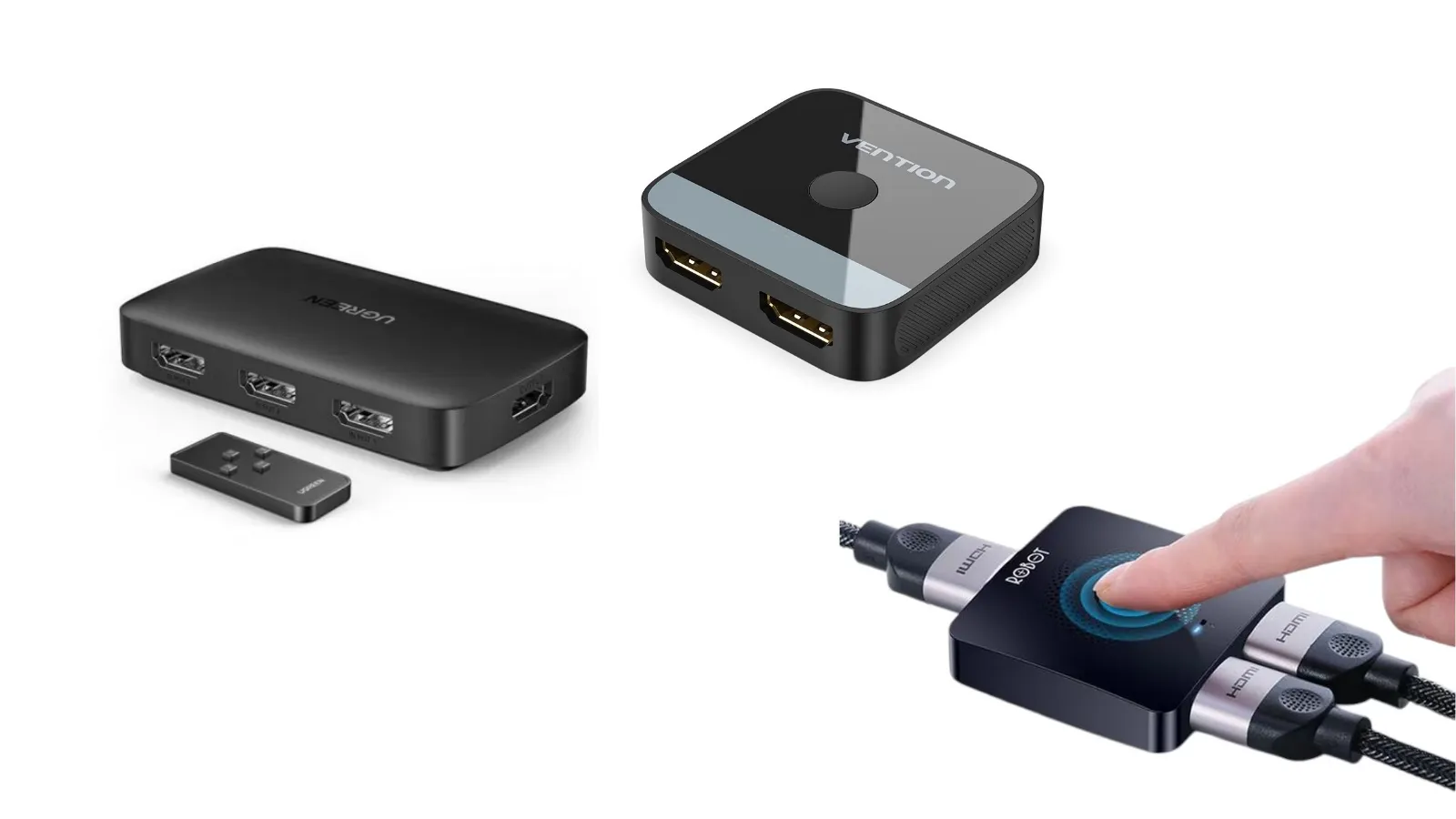
Modern home entertainment systems and productivity workspaces have evolved significantly over the past decade, frequently resulting in a cluttered ecosystem of digital hardware. Today, a typical consumer setup often involves an array of devices—ranging from modern laptops and desktop PCs to gaming consoles like the PlayStation 5 and Xbox Series X, alongside streaming boxes like Apple TV, Roku, or Chromecast. However, this convergence of technology has exposed a persistent hardware limitation in modern display technology: the scarcity of HDMI ports.
Most contemporary televisions, even high-end models, typically feature between two and four HDMI ports. Computer monitors are often even more constrained, frequently providing only one or two display inputs. When a user possesses more devices than available ports, they are forced into a cumbersome cycle of manually disconnecting and reconnecting cables behind their television or monitor. Beyond the sheer inconvenience of this manual swapping, this physical friction introduces long-term hardware risks. Frequent insertion and extraction stress the delicate internal pins of physical HDMI ports, potentially leading to premature wear, loose connections, and permanent hardware failure that requires costly repairs or replacements.
The Mechanism and Evolution of HDMI Switchers
To mitigate the port-scarcity dilemma without necessitating the purchase of a brand-new display, consumers increasingly turn to dedicated hardware accessories known as HDMI switchers. Unlike a splitter—which takes a single video source and duplicates it across multiple screens—an HDMI switcher operates in reverse. It allows multiple independent video sources to connect into a single display unit via a series of dedicated input ports, funneled through one unified output line that runs directly to the television or monitor.
The operational architecture of an HDMI switcher is straightforward. A standard configuration might feature three or four HDMI inputs and one HDMI output. Users connect their various source devices permanently to the input ports of the switcher, while running a single high-speed cable from the switcher’s output to the display screen. When the user wishes to transition from working on their laptop to playing a video game console, they no longer need to touch a physical cable. Instead, switching between sources is executed seamlessly via a physical toggle button on the device housing or remotely through an infrared (IR) or radio frequency (RF) remote control.

The evolution of these devices has tracked closely with broader display standards. Early iterations of HDMI switchers were limited to 1080p resolutions at standard refresh rates, occasionally suffering from signal degradation or latency. However, as consumer electronics advanced into 4K resolution, High Dynamic Range (HDR), and high refresh rate gaming, the engineering behind HDMI switchers had to adapt. Today’s market features sophisticated switchers equipped to handle massive data bandwidths, ensuring that signal fidelity remains uncompromised regardless of which source is active.
Critical Considerations for Choosing the Right HDMI Switcher
Navigating the marketplace for an HDMI switcher requires careful technical evaluation, as not all devices are engineered to handle the same performance thresholds. Consumers must align the specifications of the switcher with the capabilities of their connected hardware to avoid bottlenecks.
First and foremost, resolution and refresh rate support are paramount. For standard office use or media streaming, a basic switcher supporting 4K resolution at 30Hz or 60Hz is usually sufficient. However, for modern console and PC gamers utilizing displays capable of 120Hz or higher, investing in a switcher that supports high-bandwidth data transmission—such as 4K at 120Hz—is critical to prevent input lag, motion blur, and frame rate capping.
Furthermore, advanced display technologies require specific feature pass-through capabilities. A high-quality HDMI switcher must support technologies such as Variable Refresh Rate (VRR) and Auto Low Latency Mode (ALLM), which are essential for preventing screen tearing and ensuring responsive gaming experiences. Additionally, compatibility with HDCP (High-bandwidth Digital Content Protection) protocols is mandatory for streaming copyrighted 4K content from services like Netflix, Disney+, or Prime Video. Without proper HDCP handshake support, protected video streams will fail to display or will drop down to lower resolutions.
The Crucial Role of Cabling Infrastructure
A frequent point of failure in multi-device setups involving HDMI switchers is the quality of the cabling infrastructure itself. Introducing an HDMI switcher into a media chain inherently adds another layer of resistance and distance for the digital signal to travel before reaching the display panel.

Industry experts and hardware reviewers consistently emphasize that consumers cannot rely on ultra-cheap, generic HDMI cables—such as bargain-bin options priced at nominal rates—when routing high-bandwidth signals through a switcher. High-resolution feeds, particularly those operating at 4K/60Hz, 4K/120Hz, or utilizing HDR metadata, demand robust cabling constructed with proper shielding and adequate copper gauge. Utilizing substandard cables in conjunction with an HDMI switcher often results in intermittent signal dropouts, screen flickering, audio-video synchronization issues, or a complete absence of image output. Therefore, ensuring that both the input and output lines consist of certified, high-speed or ultra-high-speed HDMI cables is just as important as selecting the right switcher box.
Broader Implications for Ergonomics and Workspace Design
The growing adoption of HDMI switchers points to a broader shift in modern consumer electronics toward ergonomics, efficiency, and peripheral management. As remote work, hybrid office models, and multi-platform gaming become the cultural norm, individuals are increasingly utilizing a single primary display hub for both professional productivity and personal entertainment.
By eliminating physical clutter and reducing wear and tear on expensive consumer hardware, accessories like HDMI switchers provide an economically efficient alternative to purchasing multiple dedicated displays or upgrading to television sets with larger port arrays. Ultimately, the device transcends its primary function as a simple port multiplier, serving instead as an essential organizational anchor that streamlines the modern digital lifestyle. Whether applied to a minimalist home office desk setup or an extensive living room entertainment center, the HDMI switcher remains an invaluable tool for maintaining a seamless, interconnected technological environment.