
 Tyo Susilo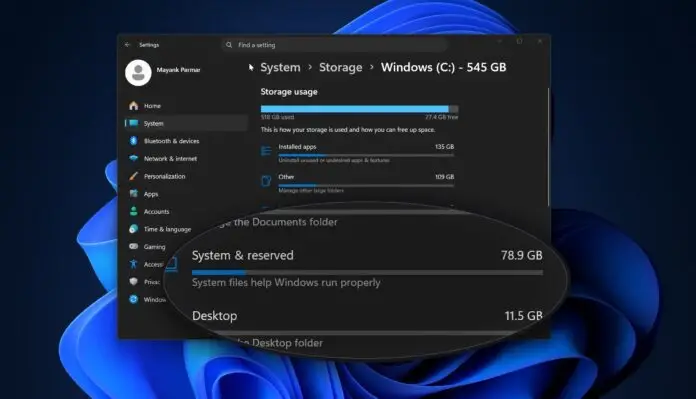
A perplexing bug within Microsoft’s latest operating system, Windows 11, is causing significant storage issues for some users, with system files inexplicably ballooning to consume hundreds of gigabytes of disk space. This phenomenon, which can leave PCs with unexpectedly full storage drives even without the installation of new applications or the saving of large files, has been linked to a specific system log file that is failing to be properly managed by the operating system. While malware has been a common suspect for sudden storage depletion, this new issue points towards a critical flaw within Windows 11 itself.
The affected file, identified as CapabilityAccessManager.db-wal, is an integral component of the Capability Access Manager system. This system is responsible for governing application permissions, dictating which programs can access sensitive hardware and data such as the camera, microphone, location services, and other privacy-related features. Typically, log files like this are designed to be automatically managed and compacted to prevent excessive storage consumption. However, a newly identified bug prevents this crucial maintenance function from occurring, leading to a continuous and unchecked expansion of the CapabilityAccessManager.db-wal file.
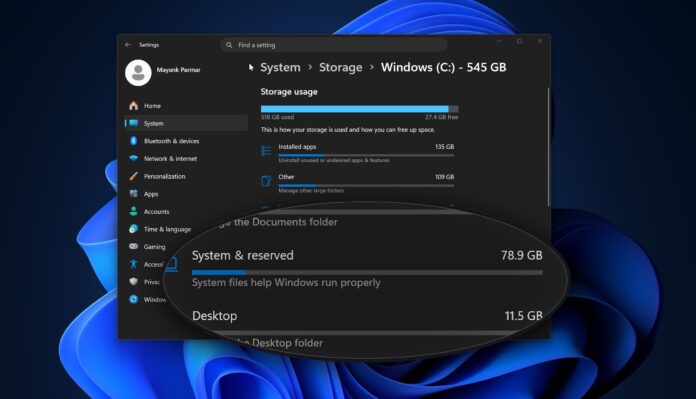
Early reports from affected users paint a concerning picture. Some individuals have observed their system files growing to as much as 70GB, while others have documented sizes reaching 200GB. In more extreme cases, the file has been reported to swell to a staggering 513GB. This dramatic increase often manifests as a disproportionately large "System files" category within Windows 11’s Storage settings, a clear indicator that the system may be experiencing this particular bug. The implications for users are substantial, potentially rendering their devices unusable or forcing them to undertake complex troubleshooting steps and significant data management to reclaim disk space.
The Unfolding of the Storage Crisis
The emergence of this bug appears to have been a gradual realization among Windows 11 users. While precise timelines are difficult to establish without official statements from Microsoft detailing the bug’s discovery, user forums and technology news outlets began reporting instances of unusually large system files in recent weeks. Anecdotal evidence suggests that the issue may have been present for some time, with users gradually noticing their storage capacity diminishing without a clear cause.
The CapabilityAccessManager.db-wal file is a write-ahead log file associated with the SQLite database used by the Capability Access Manager. SQLite databases use write-ahead logging (WAL) to improve concurrency and durability. In a WAL mode, changes are first written to a separate log file (.wal) before being applied to the main database file (.db). This log file is then periodically "checkpointed," which means its contents are merged back into the main database file, and the log file is truncated or deleted. The bug appears to be interrupting this checkpointing process, causing the .wal file to accumulate all subsequent write operations without ever being cleaned up.
This unchecked growth can have a cascading effect on system performance. As storage drives fill up, especially the primary drive where the operating system resides, Windows can experience significant slowdowns, application crashes, and an inability to install updates or even save new files. For users with smaller SSDs, this issue can become critical very quickly, rendering their devices practically unusable.
Microsoft’s Response and Potential Solutions
In response to the growing number of user complaints, Microsoft has acknowledged the issue and is working on a resolution. A fix has been prepared and is available through an optional update, specifically KB5095093. This update is slated to be included in the upcoming Patch Tuesday release for July, a monthly schedule during which Microsoft typically releases cumulative updates containing security patches and bug fixes.
While the availability of KB5095093 as an optional update provides a potential immediate solution for those experiencing the problem, it also highlights a common challenge in software development. Bugs of this nature can sometimes fly under the radar during testing phases, especially if they are dependent on specific usage patterns or system configurations. The fact that it affects a core system component like the Capability Access Manager underscores the complexity of modern operating systems.
Microsoft has not yet officially disclosed the exact root cause of the bug, though it is understood to be related to the aforementioned file management issue within the Capability Access Manager. It is also important to note that not all Windows 11 users are reportedly affected by this bug, suggesting that certain conditions or configurations might be necessary for it to manifest. This variability can make diagnosing and resolving such issues more challenging.
Broader Implications and User Impact
The storage consumption bug in Windows 11 serves as a stark reminder of the intricate relationship between operating system health and user experience. For individuals and organizations relying on their computers for daily operations, unexpected and substantial loss of storage space can lead to significant disruption.
- Productivity Losses: Users unable to save work, install critical software updates, or run applications due to full storage drives will inevitably experience downtime and reduced productivity.
- Data Integrity Concerns: While not directly a data corruption issue, a full drive can prevent backups from completing, potentially leaving users vulnerable in the event of hardware failure.
- Troubleshooting Burden: Users are often left to their own devices to diagnose and resolve such issues, leading to frustration and time spent on complex technical tasks rather than their intended work.
- Trust and Reliability: Persistent bugs, especially those impacting core functionality like storage management, can erode user trust in the operating system’s reliability and Microsoft’s quality control.
The impact is particularly acute for users with Solid State Drives (SSDs) that have limited capacities. Modern operating systems and applications are increasingly demanding in terms of storage space, and a bug that consumes hundreds of gigabytes can quickly render a 256GB or 512GB SSD unusable.
Looking Ahead: Preventing Future Storage Nightmares
The incident underscores the ongoing importance of robust testing and quality assurance processes within software development. For operating systems as complex as Windows 11, this involves not only functional testing but also extensive performance and stability testing under a wide range of user scenarios and hardware configurations.
Microsoft’s commitment to addressing the bug through updates is a positive step. However, the company’s transparency regarding the bug’s origin and the steps being taken to prevent similar occurrences in the future will be crucial for maintaining user confidence.
For Windows 11 users who suspect they might be affected by this bug, the following steps are recommended:
- Check Storage Usage: Navigate to Settings > System > Storage. Examine the breakdown of storage usage, paying close attention to the "System files" category. If this category appears unusually large, it may indicate the presence of the bug.
- Install Optional Updates: Go to Settings > Windows Update and check for available updates. If KB5095093 is listed as an optional update, it is advisable to install it. Users may need to select "Advanced options" and then "Optional updates" to find it.
- Monitor System Performance: After applying the update, monitor system performance and storage space to ensure the issue has been resolved.
- Seek Support if Necessary: If the problem persists or if users are uncomfortable performing these steps, contacting Microsoft Support or a qualified IT professional is recommended.
While the underlying cause of the CapabilityAccessManager.db-wal file’s exponential growth remains under investigation by Microsoft, the immediate concern for users is the recovery of their lost storage space. The proactive release of a fix, even as an optional update, demonstrates Microsoft’s responsiveness to user feedback and its commitment to maintaining the integrity of the Windows 11 experience. This incident, however, serves as a potent reminder of the continuous challenges in managing complex software ecosystems and the critical importance of vigilant monitoring and prompt resolution of system-level bugs. The tech industry, and indeed users globally, will be watching closely to see how Microsoft addresses the aftermath of this storage-draining glitch and what measures will be put in place to prevent its recurrence.