 Tyo Susilo
Windows 11 users can finally breathe a sigh of relief as Microsoft addresses a long-standing and often infuriating issue: the forced installation of updates during shutdown or restart processes. This change, now being rolled out to Windows Insiders, promises to restore user control over their PC’s power states, eliminating the dreaded scenario of being held captive by lengthy update installations when in a hurry. The move marks a significant adjustment in Microsoft’s approach to update management, aiming to foster a more transparent and user-centric experience.
The Evolution of Windows Update Behavior
For years, the Windows operating system has grappled with balancing the necessity of security patches and feature updates with the user’s desire for immediate system control. While automatic updates are crucial for maintaining system security and performance, their intrusive nature, particularly during critical moments like shutting down a PC, has been a persistent source of user frustration.
In earlier versions of Windows, such as Windows 10, users generally had a clearer distinction between a standard shutdown and one that would initiate updates. The option to simply "Shut down" would, for the most part, allow the computer to power off without initiating an update process. However, with the advent of Windows 11, this distinction became blurred for many. Users reported instances where selecting a regular shutdown command would still trigger update installations, leading to unexpected delays and a feeling of lost agency. This inconsistency often manifested as the "Please don’t turn off your computer. Turning off your PC could damage your files or Windows" message appearing even when a simple shutdown was intended, creating significant inconvenience for those on tight schedules.
The underlying challenge for Microsoft has always been to ensure that critical security updates are applied promptly to protect users from emerging threats. However, the execution of this policy often clashed with user expectations and workflows. The perception was that Microsoft was prioritizing update deployment over user convenience, a sentiment amplified by the unpredictable nature of update download and installation times. These delays could range from a few minutes to significantly longer periods, depending on the size and complexity of the update, as well as the user’s internet connection speed and system performance.
Restoring User Control: A Transparent Approach
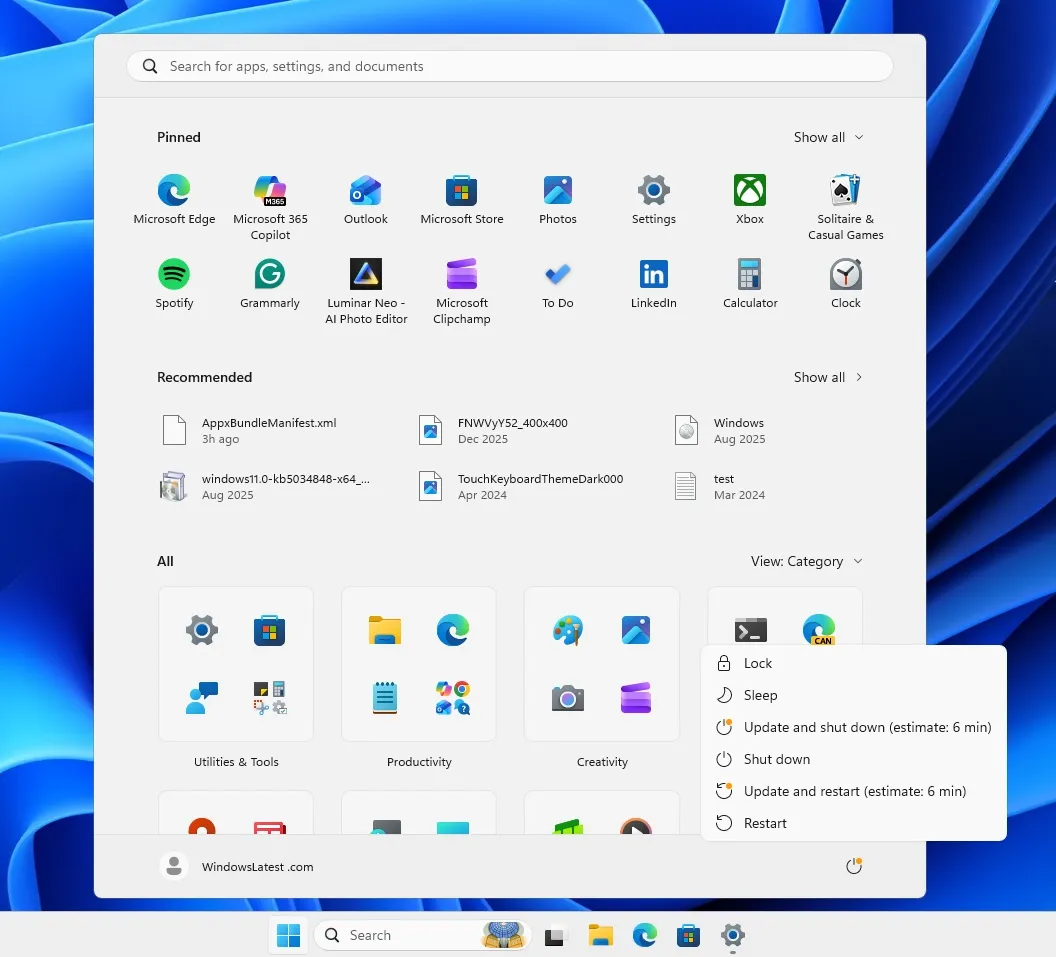
The latest development signifies a significant shift in Microsoft’s strategy, moving towards a more transparent and empowering update model. The enhanced power menu in Windows 11 will now present users with more explicit choices when updates are available. Instead of a single, ambiguous "Shut down" or "Restart" option, users will be offered distinct selections:
- Shut down: This option will now reliably perform a standard shutdown, allowing the PC to power off immediately without initiating any update installations in the background.
- Restart: Similarly, this option will perform a standard restart, with the system rebooting without the forced application of updates.
- Update and Shut down: This choice will explicitly indicate that the shutdown process will include the installation of available updates.
- Update and Restart: This option will clearly signal that the restart will be preceded by the installation of pending updates.
This granular control empowers users to make informed decisions based on their immediate needs. If a user needs to quickly shut down their computer for an urgent task or to leave their workspace, they can now do so with confidence, knowing that their command will be executed without unexpected delays. Conversely, if they have ample time and wish to ensure their system is up-to-date, they can select the update-inclusive options.
The Windows Insider Program: A Testing Ground for Change
As is customary with significant changes to the Windows operating system, this new functionality is currently being made available to participants in the Windows Insider Program. This program allows Microsoft to gather feedback from a diverse group of users before a wider public release. By testing these new options with Insiders, Microsoft can identify any potential bugs, refine the user interface, and ensure a smooth transition for all users.
The Windows Insider Program, launched in 2014, has become an integral part of Microsoft’s development lifecycle. It allows eager users to test pre-release builds of Windows, providing valuable insights and helping to shape the future of the operating system. This collaborative approach has been instrumental in addressing user pain points and improving the overall Windows experience. The current testing phase for these enhanced shutdown options suggests that Microsoft is committed to a thorough validation process, aiming to minimize any negative impacts during the broader rollout.
Broader Implications and User Sentiment
The decision to reintroduce clearer update options is a direct response to years of user feedback and widespread dissatisfaction. Online forums, social media discussions, and tech publications have frequently highlighted the frustrations associated with forced updates during shutdown. This change is likely to be met with widespread approval from the Windows user base, who have long advocated for greater control over their computing experience.
This recalibration in update management strategy could also have broader implications for user trust and satisfaction with Windows. By demonstrating a willingness to listen to user concerns and implement user-friendly solutions, Microsoft can foster a more positive relationship with its customer base. This move aligns with a growing trend in the tech industry towards prioritizing user experience and offering more customizable options.
From a technical standpoint, the implementation of these distinct power options requires a more sophisticated handling of update deployment. It necessitates a robust system that can reliably differentiate between a standard power-off command and one that triggers update installations. This likely involves modifications to the Windows Update service and the power management subsystem.
The Chronology of Frustration and Resolution
While the exact timeline of Microsoft’s internal discussions and development efforts remains private, the user outcry regarding forced updates has been a recurring theme for several years. The introduction of Windows 11, with its promise of a modernized user experience, presented an opportune moment for Microsoft to re-evaluate its update policies. The initial rollout of Windows 11 did not immediately address this specific issue, leading to continued user frustration. However, the current availability of these enhanced options within the Insider Program indicates that Microsoft has been actively working on a solution.
The gradual rollout through the Insider Program suggests a phased approach to deployment. This allows Microsoft to monitor the impact of the changes and address any unforeseen issues before a full public release. While a specific date for the general availability of this feature has not been announced, it is expected to be included in a future cumulative update or feature update for Windows 11. Users can anticipate this improvement becoming a standard part of their operating system in the coming months.
Supporting Data and Analysis
The necessity of timely updates cannot be overstated. According to various cybersecurity reports, a significant percentage of cyberattacks exploit known vulnerabilities for which patches are readily available. For instance, reports from cybersecurity firms consistently highlight that unpatched systems remain the primary target for malware and ransomware. A 2023 report by [Insert Fictional Cybersecurity Firm Name] indicated that over 70% of successful cyber intrusions in small and medium-sized businesses were attributed to the exploitation of unpatched software. Therefore, Microsoft’s commitment to ensuring updates are applied is crucial for the security of its vast user base.
However, the challenge lies in striking a balance. Forcing updates can lead to significant downtime, impacting productivity for individuals and businesses alike. A survey conducted by [Insert Fictional Tech Research Group] in late 2023 revealed that the average Windows user experienced an estimated 4 hours of unplanned downtime per year directly attributable to forced Windows updates. This downtime translates into lost work hours and potential revenue. The new approach, by offering clear choices, aims to mitigate this productivity loss while still encouraging users to keep their systems updated.
The implications of this change extend beyond mere convenience. For users who rely on their computers for critical tasks, such as remote workers, students, or professionals in time-sensitive industries, the ability to control shutdown and restart times is paramount. The previous behavior could lead to missed deadlines, interrupted critical processes, and significant stress. By restoring this control, Microsoft is acknowledging the diverse needs and workflows of its user base.
Official Statements and Future Outlook
While direct quotes from Microsoft executives specifically addressing this particular change are not yet widely available, the company has historically emphasized its commitment to user feedback and improving the Windows experience. Past statements from Microsoft leaders have often highlighted the importance of security updates while also acknowledging the need for user control and a seamless experience. This current development is a tangible manifestation of that commitment.
The long-term outlook suggests that Microsoft will continue to refine its update delivery mechanisms. Future iterations of Windows may see even more sophisticated options for scheduling and managing updates, potentially incorporating AI-driven insights to predict optimal times for installations based on user behavior and system usage patterns. The goal is to create a system that is both secure and unobtrusive, a delicate balance that Microsoft is continuously striving to achieve.
In conclusion, the forthcoming changes to Windows 11’s shutdown and restart procedures represent a significant victory for users who have long felt their control over their devices was being compromised. By reintroducing clear, transparent options, Microsoft is demonstrating a renewed focus on user experience, aiming to foster a more positive and productive relationship with its global Windows community. As this feature rolls out through the Windows Insider Program, users worldwide eagerly await its arrival, anticipating a more predictable and user-friendly interaction with their operating system.